
Post-Processing FX
Post-Processing FX v6.0
Welcome to a big Post-Processing FX update!
Includes the newest and most amazing Debug UI! It's cleaner, more functional, and the internal code is much better. Menus are still under development, but you can already test everything from PPFX_Renderer in it. To create the UI, simply call this:
ppfx_debug_show(true, id, renderer);
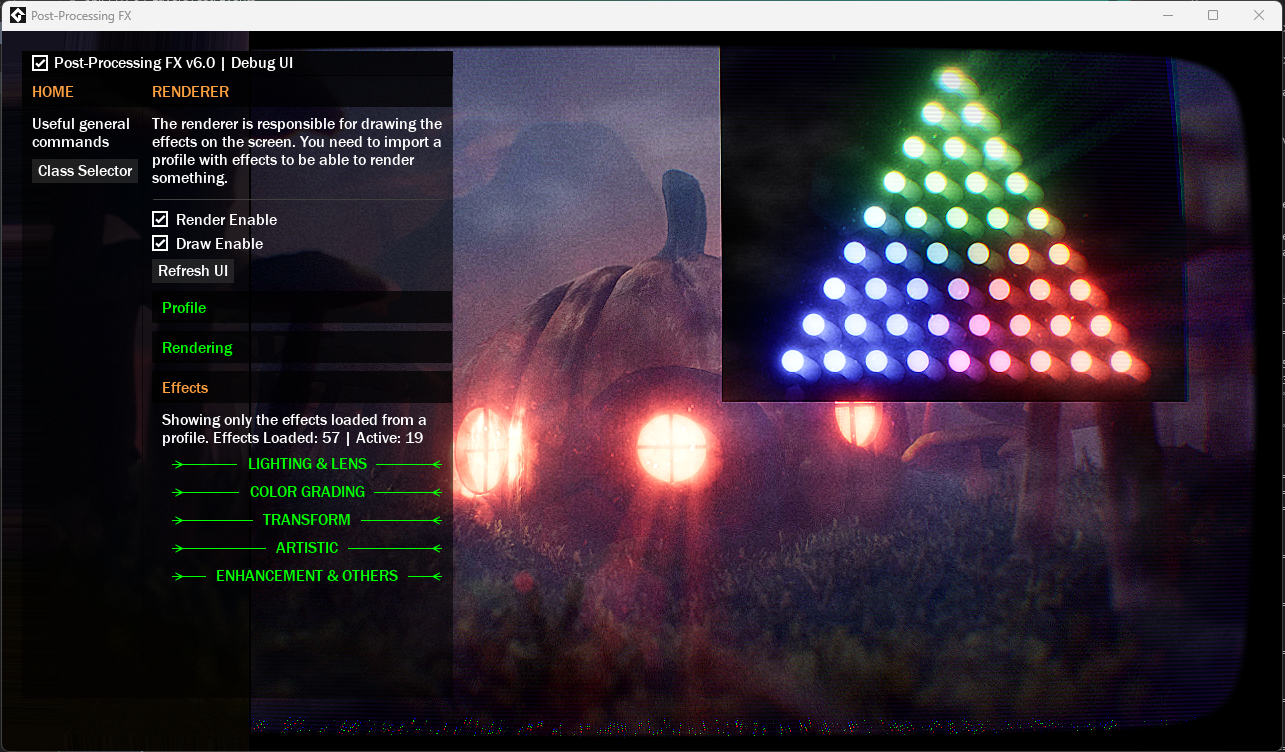
IMPORTANT: The old Debug UI still exists and functions the same way. It will remain until the new Debug UI is fully implemented.
⚠️ This version includes breaking changes, intended to improve the quality of PPFX. So I don't recommend using it in existing projects, unless you are willing to implement the changes.
Read the release notes to find out what's new and different:
[ADDED] New much better powerful Debug UI! This new UI was rebuilt from scratch and supports real-time variable updates. (Still in progress, but works great).
You can create this UI by calling: ppfx_debug_show(true, id, renderer);
NOTE: The old Debug UI is still there for now.
[ADDED] PP_COLOR_TINT_INTENSITY parameter to FX_ColorTint() effect.
[ADDED] PP_BLOOM_SOURCE_OFFSET parameter to FX_Bloom() effect.
[ADDED] "loadOnce" parameter to .ProfileLoad() from PPFX_Renderer(). If true, if you call this function again and the profile reference is the same, it will not be loaded again.
[ADDED] The .DisableAllEffects() function of PPFX_Renderer() now also automatically clears internal surfaces too.
[FIXED] The .Stringify() function from PPFX_Profile() was having issues exporting negative numbers.
[FIXED] .Draw() returned an error because the internal variable did not exist.
[FIXED] FX_Speedlines() now prevents visual glitches if remap or power is set to 1 in certain situations.
[FIXED] The Bayer matrix of the FX_Dithering() effect behaved strangely if you enabled bilinear filtering.
[FIXED] Internally more organized PPFX_Renderer().
[FIXED] PPFX_Renderer() little internal improvements.
[FIXED] "remap" from Mist effect is now clamped between 0-1 to prevent issues.
[FIXED] Some Feather documentation errors.
[CHANGED] The .DrawInFullscreen() and .Draw() functions now only draw the renderer, and no longer render + draw. So you should remove the surface reference from it.
The .Render() function has now been added for rendering only.
This means that in practice, if you are using Post-Processing FX alone, you must call the .Render() and .Draw()/.DrawInfullscreen() functions.
Example:
renderer.Render(application_surface); // also returns the final surface with effects
renderer.DrawInFullscreen();
If you are using Post-Processing FX with Rezol and RenderStack, the .Render() function is sufficient, since Rezol is responsible for drawing the final surface.
[CHANGED] The .Draw() and .DrawInFullscreen() functions no longer return the final surface. Now, only .Render() does that.
[CHANGED] "PPFX_STACK" enum renamed to "PPFX_STACK_ORDER", to make more sense.
[CHANGED] The "PPFX_STACK_ORDER" enum now has orders separated by 100, to facilitate in-game ordering.
[CHANGED] "__PPF_FXSuperClass" renamed to "FX_Effect".
[CHANGED] "__PPF_STSuperClass" renamed to "FX_SharedStack".
[CHANGED] FX_Colorize: "hue", "saturation", and "value" are now simply "color," for consistency with the FX_ColorTint effect.
[CHANGED] The order of the "intensity" parameter of the FX_Interference() effect for consistency with other effects.
[CHANGED] The order of the "iterations" parameter of the FX_KawaseBlur() effect for consistency with other effects.
[REMOVED] The requirement to only be able to draw PPFX_Renderer() in Post-Draw and Draw GUI Begin while using "application_surface".
Thanks for listening! please leave a review, thank you ^^
Leave a comment
Log in with itch.io to leave a comment.